73% of UK businesses now operate hybrid working models, yet only 28% have redesigned their office spaces to support this fundamental shift in how teams collaborate and work.
The mismatch between traditional office layouts and hybrid work requirements creates daily frustrations for both employees and business owners. Underutilised desks waste expensive office space, whilst insufficient collaboration areas leave teams struggling to connect during their limited in-office time. Video calls conducted in open-plan areas disrupt colleagues, and inadequate technology makes remote workers feel like second-class team members.
For growing SMEs, hybrid working presents both challenges and opportunities. The right office design can reduce space costs whilst improving productivity, team cohesion, and employee satisfaction. Poor design, however, leads to wasted rent, reduced collaboration, and competitive disadvantages in attracting and retaining talent.
At Corporate Interiors, we’ve helped numerous businesses transform traditional offices into flexible hybrid workspaces that support modern work patterns without requiring complete rebuilds or excessive investment. The key lies in understanding how hybrid teams actually work and designing spaces that facilitate their specific needs.
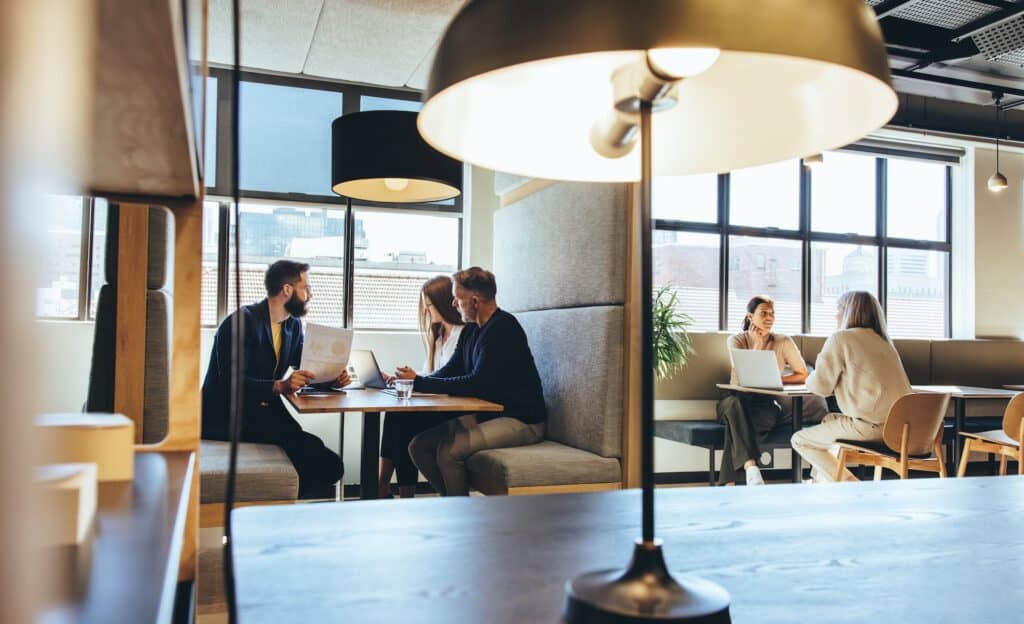
Understanding Hybrid Working Challenges
The Hybrid Work Reality for SMEs
Hybrid working takes various forms across different businesses. Some organisations operate fixed schedules where teams attend on designated days, whilst others allow employee choice within broad guidelines. Role-based flexibility sees client-facing staff attending more frequently than roles suitable for remote work.
According to CIPD research, 44% of UK organisations now offer hybrid working arrangements, with this figure rising to 63% for professional services firms. For SMEs, hybrid models provide flexibility to attract talent whilst potentially reducing office space requirements and associated costs.
The challenge lies in maintaining pre-pandemic desk ratios whilst most employees only attend 2-3 days weekly. A business with 20 employees might have needed 20 desks previously, but could operate effectively with 12-15 workstations in a properly designed hybrid environment. However, this requires fundamentally rethinking how office space is allocated and used.
Common Pain Points in Traditional Office Layouts
Traditional office layouts designed for full-time attendance create significant inefficiencies in hybrid models. Fixed desk assignments result in empty workstations throughout the week, wasting space that could serve more productive purposes. Meanwhile, collaboration areas designed for occasional meetings prove inadequate when teams concentrate their collaborative work into specific attendance days.
Meeting room shortages become acute when entire teams attend simultaneously, whilst the lack of private spaces for video calls forces employees to conduct confidential conversations in open areas that disturb colleagues and compromise privacy.
Technology inadequacies that were merely inconvenient in traditional offices become critical barriers in hybrid environments. Poor WiFi, inadequate video conferencing equipment, and absent desk booking systems frustrate employees and reduce the value proposition of office attendance.
Why Office Design Matters More in Hybrid Models
In hybrid working models, office attendance becomes voluntary for many roles, meaning the workspace must actively justify the commute. Employees comparing home working convenience against office attendance need compelling reasons to travel – superior collaboration opportunities, better technology, social connection, or environmental quality that home offices cannot match.
Limited in-office time concentrates collaborative activities into attendance days, requiring spaces specifically designed for team interaction rather than individual focused work that can occur anywhere. The office’s role shifts from providing workstations to facilitating connections that remote work cannot easily support.
First impressions become more critical when employees attend less frequently. An office that felt acceptable when experienced daily can seem disappointing when viewed with fresh eyes after several remote working days. This perception affects employee satisfaction and can influence whether talented professionals remain with organisations long-term.
Core Principles of Hybrid Office Design
Activity-Based Working Fundamentals
Activity-based working (ABW) provides the foundation for effective hybrid office design by creating different spaces optimised for specific activities rather than assigning fixed desks. Focused individual work requires quiet areas with minimal distraction, whilst collaborative tasks benefit from spaces encouraging interaction and creative thinking.
Moving beyond assigned seating enables more efficient space utilisation whilst providing employees with choice and autonomy over their work environment. A typical day might see someone using a quiet focus booth for detailed analysis, a collaboration area for team discussion, and an informal social space for relationship building.
Visual and functional zoning helps employees quickly identify appropriate spaces for their current activities. Clear signalling through furniture, colours, and layout enables intuitive navigation without complex rules or extensive training.
The 60-40 Principle for Hybrid Spaces
Traditional offices typically allocated 80% of space to individual workstations and 20% to collaboration areas, reflecting full-time attendance patterns where most time was spent at assigned desks. Hybrid offices reverse this priority, with successful designs typically providing 60% collaborative and social spaces versus 40% focused work areas.
This dramatic shift reflects hybrid work realities where focused individual work often occurs at home, whilst office time concentrates on activities benefiting from physical proximity – team meetings, brainstorming sessions, informal knowledge sharing, and relationship building that sustains company culture.
The specific ratio should reflect your team’s work patterns and hybrid policies. Teams with heavy collaborative requirements might need 70% collaboration space, whilst roles requiring extensive focused work might operate effectively with 50-50 allocation.
Flexibility as a Design Foundation
Flexible workspace design enables offices to adapt to changing team sizes, work patterns, and business requirements without major reconstruction. Modular furniture systems can be reconfigured rapidly to accommodate different team arrangements or project requirements.
Movable partition systems allow spaces to expand or contract based on need, transforming large open areas into smaller team zones or combining rooms for company-wide gatherings. This flexibility protects workspace investments by enabling adaptation rather than replacement as needs evolve.
Technology infrastructure supporting multiple uses ensures spaces remain relevant as communication tools and collaboration platforms evolve. Robust network connectivity, flexible power distribution, and adaptable audio-visual systems support various activities without requiring constant technical modifications.
Essential Spaces for Hybrid Teams
Hot Desking and Flexible Workstations
Hot desking eliminates assigned seating, allowing employees to choose available workstations based on daily needs and preferences. Successful implementation requires either booking systems that guarantee workspace availability or sufficient desks to accommodate fluctuating attendance without conflict.
Each workstation needs consistent technology and ergonomic quality regardless of location. Adjustable monitors, quality seating, adequate power outlets, and reliable network connectivity ensure every desk provides productive working conditions. Inconsistent workstation quality creates frustration and undermines hot desking benefits.
Storage solutions become critical without assigned desks. Locker systems provide secure personal storage for items employees bring to the office, whilst shared supply storage eliminates the desk drawer clutter that accumulates in traditional environments.
Focus Zones for Concentration
Despite hybrid working enabling home-based focused work, offices still need quiet areas for tasks requiring sustained concentration. Some employees lack suitable home working environments, whilst others prefer office presence for routine and separation between work and personal life.
Quiet rooms and concentration booths provide acoustic isolation enabling focused work without distraction. Soundproof partitioning creates areas where employees can concentrate on detailed analysis, report writing, or other tasks requiring sustained attention.
Booking systems for focus spaces ensure availability when needed, whilst visual privacy measures like frosted glass or strategic positioning prevent the distraction of movement without creating complete isolation that could affect wellbeing.
Collaboration Spaces for Different Team Activities
Small huddle rooms accommodating 2-4 people address the highest-demand collaboration need in hybrid offices. Quick team check-ins, one-on-one discussions, and small group problem-solving sessions require informal spaces that can be booked for short periods without the formality of boardrooms.
Medium meeting rooms for 6-8 people support team discussions and client meetings that benefit from more substantial space and professional presentation capabilities. These rooms should include quality video conferencing technology ensuring remote participants can engage effectively with in-person attendees.
Informal collaboration areas without formal booking requirements encourage spontaneous interaction and relationship building. Comfortable seating clusters near coffee points or breakout areas facilitate casual conversations that build team cohesion and enable knowledge sharing that formal meetings might miss.
Video Conferencing Facilities
Private video pods for one-on-one calls have become essential in hybrid offices where many employees conduct multiple video meetings daily. These small spaces provide acoustic isolation preventing call overlap whilst offering professional backgrounds and lighting that represent the organisation appropriately.
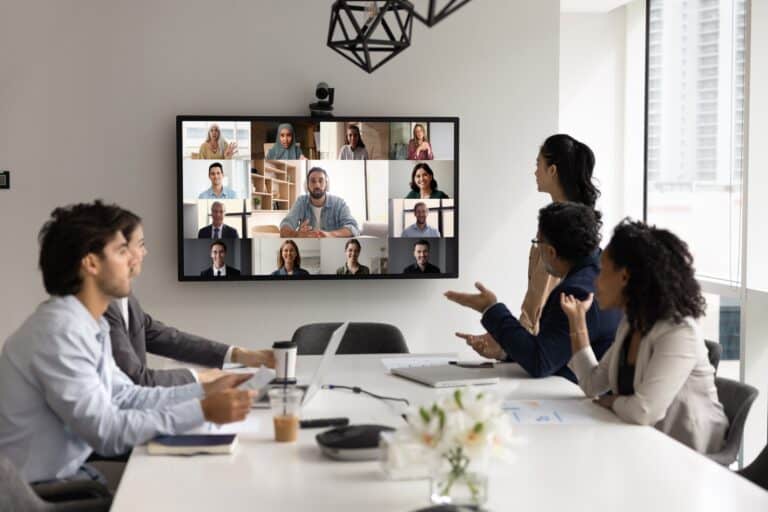
Larger video conference rooms designed specifically for hybrid meetings require careful technical specification. Camera positioning ensuring remote participants can see all in-person attendees, microphone systems capturing contributions from around the table, and display screens making remote participants visible to in-room colleagues create equitable experiences.
Strategic positioning of video facilities throughout the office prevents lengthy walks to available spaces whilst distributing acoustic impact across different areas rather than concentrating video call noise in single zones.
Social and Amenity Spaces
Kitchen and break areas serve dual purposes in hybrid offices, providing necessary amenity spaces whilst functioning as collaboration catalysts where informal interaction builds relationships and enables knowledge sharing. These areas should be inviting, well-equipped, and positioned to encourage use during breaks rather than quick food collection.
Comfortable informal seating near but separate from primary work areas creates “third spaces” that support various activities from casual conversations to informal mentoring sessions. These areas bridge the formality gap between meeting rooms and social spaces.
The quality of amenity spaces communicates organisational values and affects employee satisfaction. Well-designed, comfortable spaces signal that employee wellbeing matters, whilst inadequate facilities suggest the organisation views office attendance as obligation rather than opportunity.
Technology Infrastructure for Hybrid Success
Meeting Room Technology Standards
Video conferencing equipment quality directly affects hybrid meeting effectiveness and remote worker inclusion. Professional-grade cameras with wide-angle lenses capture all in-person participants without requiring manual adjustment, whilst intelligent framing technology automatically adjusts to focus on active speakers.
Audio systems must capture contributions from anywhere in the room without asking participants to repeat themselves or lean toward microphones. Ceiling-mounted microphone arrays or distributed table microphones ensure clear audio transmission that enables effective remote participation.
Wireless presentation capabilities eliminate the technical friction that wastes meeting time and creates frustration. Employees should be able to share content from any device without cables, adapters, or software installations that interrupt meeting flow.
Room booking displays outside meeting spaces show availability and current reservations, preventing double-bookings whilst enabling spontaneous use of unoccupied spaces. Integration with calendar systems ensures bookings appear in organisational calendars without duplicate data entry.
Desk Booking and Space Management Systems
Desk booking platforms enable employees to reserve workstations in advance, ensuring availability upon arrival whilst providing organisations with utilisation data that informs space planning decisions. Modern systems integrate with calendar applications, making booking as simple as scheduling meetings.
Occupancy analytics reveal actual space usage patterns that might differ significantly from assumptions or policies. Data on desk utilisation, meeting room demand, and collaboration area usage enables evidence-based decisions about space allocation and identifies opportunities for optimisation.
Wayfinding functionality helps employees locate colleagues who are working in the office, supporting spontaneous collaboration whilst reducing the frustration of searching for team members in flexible seating environments.
Mobile applications provide real-time space availability, enable booking modifications from anywhere, and can integrate with building access systems to streamline arrival experiences.
Network and Connectivity Requirements
Enterprise-grade WiFi becomes critical in device-dense hybrid environments where multiple video conferences, cloud applications, and IoT systems operate simultaneously. Professional wireless networks with automatic load balancing ensure reliable connectivity regardless of how many devices connect or which areas experience heavy use.
Bandwidth planning must accommodate simultaneous video conferences that consume significantly more network capacity than traditional office activities. A small office with 15 employees might need to support 8-10 concurrent video calls during peak attendance days, requiring robust internet connectivity with appropriate quality of service controls.
Network redundancy protects business operations from connectivity failures that could prevent remote workers from accessing systems or interrupt customer-facing activities. Backup internet connections and failover capabilities maintain operations during outages.
Space Planning for Different Business Sizes
Calculating Hybrid Space Requirements
Traditional office planning allocated one desk per employee, requiring approximately 100-150 square feet per person including workspace, circulation, and shared facilities. Hybrid offices can operate with 0.6-0.8 desks per employee depending on attendance patterns, potentially reducing space requirements by 20-40%.
A business with 20 employees attending an average of 3 days weekly (60% attendance rate) requires approximately 14 desks to ensure availability, assuming some scheduling coordination. This desk reduction creates space for additional collaboration areas, focus booths, and amenity spaces that better serve hybrid work patterns.
Total space requirements don’t reduce proportionally to desk reduction because additional collaboration spaces are necessary to support concentrated team interaction during attendance days. However, overall space efficiency typically improves by 15-25% compared to traditional layouts, delivering significant cost savings in expensive office markets.
Small Teams (5-15 Employees)
Small teams benefit from multi-use spaces that serve different purposes throughout the day rather than single-purpose rooms that sit empty most of the time. A medium-sized room might function as collaborative workspace during morning hours, formal meeting space for client presentations during midday, and social gathering area during breaks.
Essential space allocation for small hybrid offices includes 6-10 flexible workstations, one huddle room for 2-4 people, one larger meeting space for 6-8 people, several video call pods or booths, and a well-designed kitchen/social area. This provides adequate variety whilst remaining manageable within limited square footage.
Cost-effective solutions focus investment on technology enablement and acoustic treatment rather than expensive furniture or extensive construction. Quality video conferencing, reliable WiFi, and appropriate sound absorption deliver more value than premium finishes or elaborate design features.
Medium Businesses (15-50 Employees)
Medium-sized businesses can create distinct zones supporting different work styles whilst maintaining visual connectivity that enables informal interaction. Neighbourhood arrangements group related teams whilst providing access to shared resources and collaboration spaces.
A medium hybrid office might include 20-35 flexible desks arranged in neighbourhoods, 3-4 huddle rooms, 2 medium meeting rooms, 1 large conference room, 4-6 video pods, dedicated focus booths, and enhanced social spaces. This variety accommodates diverse work preferences whilst supporting team cohesion.
Department-specific needs can be addressed through neighbourhood customisation. Creative teams might need additional collaboration areas and display spaces, whilst analytical roles may require extra quiet zones and multiple monitor setups.
Creating Culture and Connection
Designing for Team Cohesion
Informal gathering spaces near work areas encourage spontaneous interaction that builds relationships and enables knowledge sharing absent in scheduled meetings. Strategic positioning of comfortable seating at corridor intersections or near coffee points creates natural pause points where colleagues encounter each other organically.
Visual design elements that reinforce company culture and values help maintain organisational identity across distributed teams. Displaying company history, team achievements, customer feedback, or brand values creates shared reference points that strengthen connection to organisational purpose.
Event spaces that can accommodate entire teams for company meetings, celebrations, or training sessions ensure these important culture-building activities can occur on-site when beneficial. Flexible space configurations enable transformation from daily working areas to event venues without requiring separate dedicated rooms.
Neighbourhood Zoning for Belonging
Creating team “home bases” within flexible environments provides sense of place and belonging whilst maintaining hot desking efficiency. Neighbourhoods might include designated areas where team members typically work, shared storage for team materials, and displays showing team projects or goals.
This approach balances flexibility benefits with human needs for territory and identity. Employees gain autonomy to choose specific workstations whilst knowing their team operates within defined areas where they’ll encounter colleagues and feel part of cohesive groups.
Cross-functional collaboration remains important, achieved through shared meeting spaces, central amenity areas, and visual connectivity across neighbourhoods. Physical separation should never impede necessary interaction between different teams or departments.
Budget Planning for Hybrid Transformation
Investment Levels and Priorities
Basic hybrid adaptations for small offices typically cost £10,000-£25,000 and focus on essential changes enabling flexible working without major construction. This might include booking software, additional collaboration furniture, acoustic treatments, video conferencing equipment upgrades, and locker systems.
Moderate redesigns ranging from £25,000-£75,000 for medium offices incorporate modular partitioning systems, comprehensive technology infrastructure, purpose-built focus booths and huddle rooms, and enhanced amenity spaces. This level delivers comprehensive hybrid functionality with measurable ROI.
Comprehensive transformations exceeding £75,000 involve significant layout restructuring, premium technology integration, and high-quality finishes creating distinctive environments. This investment level suits businesses using office quality as competitive advantage in talent markets or requiring particular brand representation.
Prioritising for Maximum Impact
Technology infrastructure forms the foundation of hybrid office functionality and should receive early investment priority. Reliable WiFi, quality video conferencing, and booking systems enable hybrid working even in less-than-ideal physical environments, whilst inadequate technology undermines even beautifully designed spaces.
Collaboration spaces that facilitate team interaction during office attendance justify commute and deliver unique value that home working cannot replicate. Investment in varied, well-equipped collaboration areas typically provides higher returns than spending equivalent amounts on individual workstations.
Acoustic treatments preventing video call interference and enabling focused work prove surprisingly cost-effective relative to their impact. Strategic acoustic panel placement, sound-masking systems, or acoustic partitioning can transform problematic open environments into functional hybrid workspaces.
ROI from Hybrid Office Design
Space cost savings from reduced desk requirements can offset hybrid redesign investments within 18-36 months in expensive office markets. A business reducing from 2,500 to 2,000 square feet whilst improving environment quality achieves both immediate cost reduction and enhanced employee experience.
Productivity improvements from better-designed environments typically range from 8-15% according to workplace research, though precise measurement proves challenging. Reduced time finding appropriate spaces, fewer technology frustrations, and improved acoustic conditions all contribute to efficiency gains.
Retention benefits emerge from employee satisfaction with flexible working arrangements and quality office environments. Replacing a skilled employee costs 50-200% of their annual salary through recruitment, training, and lost productivity. Improving retention through better hybrid office design provides substantial but often unrecognised value.

Getting Started with Hybrid Office Design
Assessing Your Current Situation
Begin by evaluating actual attendance patterns rather than policies or assumptions. Track office attendance over 4-6 weeks, noting daily headcounts, peak attendance days, and space utilisation patterns. This data reveals whether current space matches actual needs and identifies specific pain points requiring attention.
Employee feedback provides crucial insights into what works well and what frustrates teams about current arrangements. Simple surveys asking about space adequacy, technology functionality, and hybrid experience quality highlight priority improvement areas whilst demonstrating organisational commitment to employee input.
Space utilisation analysis examines how different areas function in hybrid context. Meeting rooms might be overbooked whilst desk areas remain underutilised, or vice versa. Understanding these patterns informs reallocation decisions that better match supply with demand.
Planning Your Hybrid Transformation
Start with clear objectives based on business needs rather than design trends. Are you primarily seeking cost reduction through smaller space, improved collaboration, enhanced employee satisfaction, or competitive advantage in talent markets? Clear goals ensure design decisions support business priorities.
Phased implementation enables budget management whilst delivering incremental improvements that build momentum for comprehensive change. Initial phases might address critical pain points like inadequate meeting rooms or poor technology, whilst subsequent phases enhance environment quality and expand space variety.
Professional guidance from experienced office design specialists ensures hybrid office investments deliver intended outcomes whilst avoiding common pitfalls. At Corporate Interiors, we help businesses navigate hybrid transformation through needs assessment, space planning, technology specification, and implementation management that coordinates various trades and minimises business disruption.
Transform Your Workspace for Hybrid Success
Hybrid working represents a permanent shift in how businesses operate, requiring thoughtful office design that supports distributed teams whilst justifying the commute through superior collaboration and connection opportunities. The businesses thriving in hybrid environments recognise that office spaces must evolve from workstation warehouses to collaboration catalysts.
Successful hybrid office design balances flexibility with functionality, providing varied spaces that accommodate different work activities whilst maintaining efficiency and cost control. From hot desking systems maximising space utilisation to video conferencing facilities ensuring remote worker inclusion, every element should support your specific team’s hybrid working patterns.
The investment in hybrid workspace transformation delivers returns through reduced space costs, improved productivity, enhanced employee satisfaction, and competitive advantages in talent markets where flexible working and quality office environments influence employment decisions. Starting with clear understanding of your team’s work patterns and business objectives ensures design decisions deliver genuine value rather than following generic trends.
At Corporate Interiors, we specialise in helping SMEs transform traditional offices into flexible hybrid workspaces that support modern work patterns without excessive investment or business disruption. Our experience with flexible partitioning, technology integration, and space planning enables us to create solutions addressing your specific challenges whilst remaining within budget constraints.
Ready to create an office environment that truly supports your hybrid team? Contact our workspace design specialists for a comprehensive assessment of your current space and expert guidance on creating a hybrid office that enhances collaboration, optimises costs, and positions your business for continued success.
Schedule your hybrid workspace consultation and discover how strategic office design can transform your hybrid working experience from compromise to competitive advantage.